
Smart Appliance Cybersecurity and Privacy Protection: Your Guide to a Safer Home
Your fridge knows your grocery habits. Your thermostat learns your schedule. Your voice assistant hears your conversations. We’ve welcomed these smart appliances into our homes for convenience, but honestly, have we stopped to think about the digital doors they might leave unlocked? The truth is, cybersecurity and privacy protection aren’t just for your laptop anymore. They’re for your toaster, too.
Let’s dive in. The connected home is a marvel, but it’s also a complex web of data streams. Protecting it isn’t about paranoia—it’s about practical awareness. Think of it like this: you wouldn’t leave your front door wide open. So why leave your network vulnerable?
Why Your Smart Fridge Could Be a Security Risk
It sounds like sci-fi, but it’s a real-world issue. Smart appliances are, at their core, small computers. And any computer connected to the internet can be a target. The risks generally fall into two buckets: cybersecurity threats and privacy invasions.
Common Threats to Your Connected Home
First, the cybersecurity angle. Weak spots in your smart devices can be exploited by bad actors. Here’s what that can look like:
- Botnet Recruitment: Hackers can infect thousands of devices—like smart cameras or lightbulbs—to create a “botnet.” This network of zombie devices is then used to launch massive attacks on other websites, slowing your own internet in the process.
- Network Gateway Attacks: A poorly secured smart plug can serve as a backdoor into your entire home network. Once inside, attackers can potentially access your laptops, phones, and sensitive personal data.
- Ransomware and Manipulation: Imagine your smart lock refusing to open or your thermostat cranked to 95 degrees until you pay a fee. It’s a nightmare scenario that underscores the need for robust protection.
The Privacy Problem: What Data Is Collected?
Then there’s the privacy side. This is often less about malicious hackers and more about data collection practices. Your devices are gathering information constantly. A smart TV tracks your viewing habits. A robot vacuum maps your home’s floor plan. A voice assistant records snippets of audio.
The question isn’t just if this data is collected, but how it’s used, stored, and potentially shared. Could your energy usage data reveal when you’re on vacation? Possibly. It’s a layer of exposure we simply didn’t have a decade ago.
Practical Steps for Smart Appliance Security
Okay, enough with the scary stuff. Here’s the deal: you’re not powerless. Securing your smart home is a series of habits, not a one-time fix. Let’s break it down into actionable steps.
1. Build a Strong Network Foundation
Everything starts with your Wi-Fi router. It’s the front gate.
- Change Default Credentials: Immediately change the default username and password on your router. Those factory settings are public knowledge.
- Use WPA3 Encryption: If your router supports it, enable WPA3 security. If not, make sure WPA2 is on. Never use open or WEP encryption.
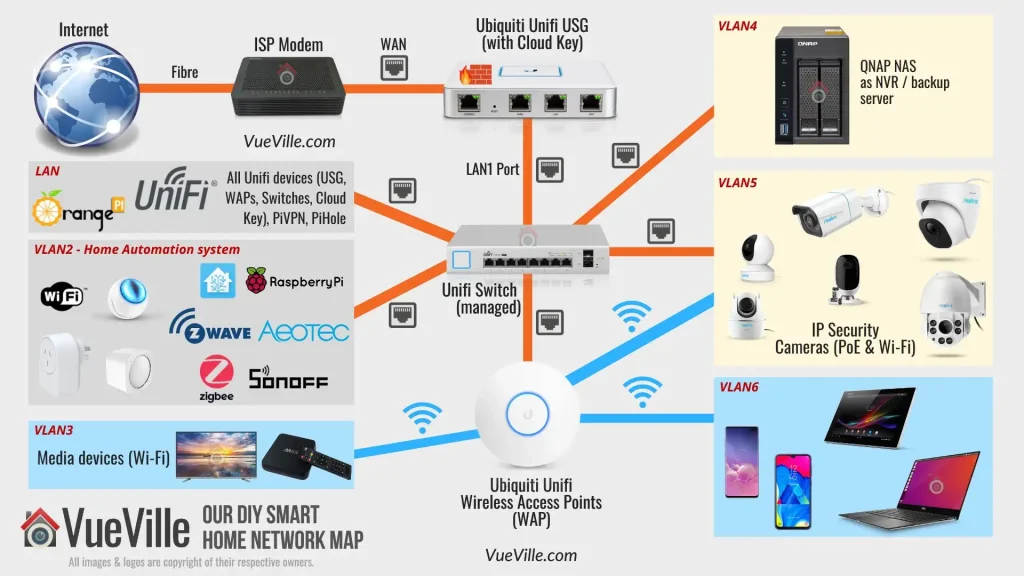
- Create a Guest Network: This is a huge one. Put all your smart appliances on a separate guest network. This isolates them from your main devices (like your work computer) containing sensitive info.
2. Master Device Management
Each new device is a new responsibility. Treat it that way.
| Action | Why It Matters |
| Research before you buy | Look for brands with a strong security reputation and a history of issuing updates. |
| Change device passwords | Use unique, strong passwords for each device/app account. A password manager is essential here. |
| Enable Multi-Factor Authentication (MFA) | Adds a critical second step to verify it’s really you logging in. |
| Update firmware automatically | Those updates often patch security holes. Turn on auto-update where possible. |
3. Lock Down Your Privacy Settings
This is where you get granular. Dive into the companion app for every single device. It’s tedious, but it’s key. Disable any data-sharing features you’re not comfortable with. Limit microphone or camera access when not in use. Review the privacy policy—I know, a boring read—to understand what the company does with your data. Opt out of “personalized ads” if the option exists.
And for voice assistants, regularly review and delete your voice history. It feels a bit like tidying up digital crumbs, but it works.
The Human Factor: Your Role in a Secure Ecosystem
Technology can only do so much. The most common vulnerabilities, you know, often come from simple oversights. Using the same password everywhere. Clicking on a phishing email that seems to be from your “smart home provider.” Forgetting to physically update that smart hub you bought three years ago.
Make a habit of auditing your connected devices every few months. Ask yourself: Do I still use this? Is it still supported? Are the settings still correct? It’s like a digital spring cleaning.
Looking Ahead: The Future of Smart Home Safety
The industry is slowly waking up. We’re seeing new security standards emerge, like the Matter protocol, which aims to build security into the design phase. Regulations are beginning to catch up, too, holding manufacturers more accountable for the devices they sell.
But in the end, the smart home is a partnership. Companies must build secure products. And we, as users, must be proactive stewards of our own digital domains. The goal isn’t to unplug and go back to a simpler time. It’s to embrace the convenience without being naive about the cost.
So, the next time you ask your speaker to play a song or tell your oven to preheat remotely, take a second. Appreciate the magic, sure. But also remember the invisible threads connecting it all. A secure, private smart home isn’t a product you buy—it’s a mindful practice you build, one smart decision at a time.
About Author


